advanced import

v1.2 Release Notes

We’re very excited to announce the release of Optyx v1.2 and a slew of highly requested features and fixes from users like you!

Features

Advanced Import

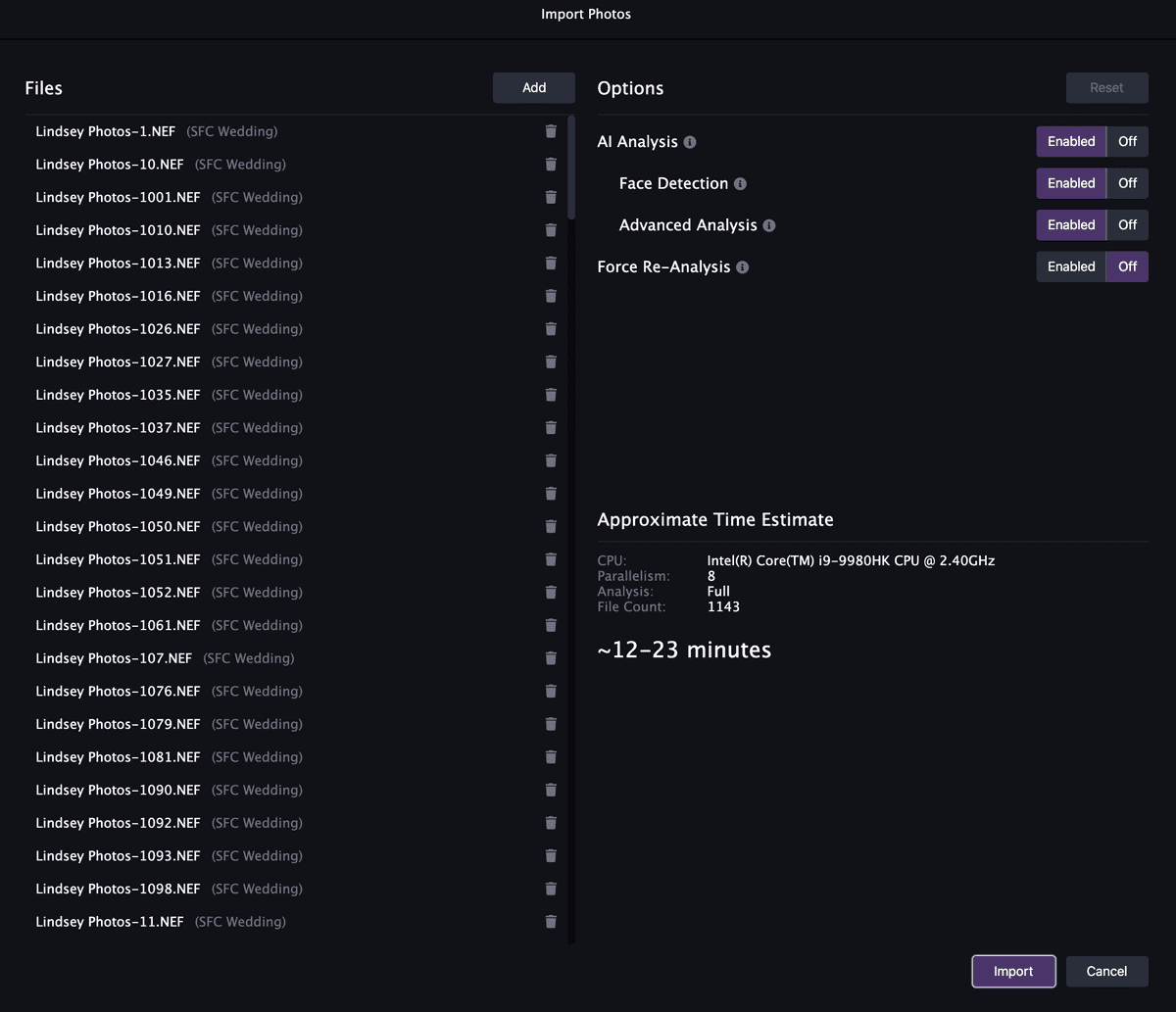
You asked; we listened. Import just got a whole lot smarter! Control exactly what analysis to perform or skip straight to manually culling 10x faster with advanced import controls. Estimate how long each import will take ahead of time so you can go get that coffee if your 10,000 photo wedding will take a while.

Mouse-Tracked Detail Pane

The v1.1 Detail pane in Optyx was fairly limited and only available after running expensive 1:1 preview generation. v1.2 introduces the newly revamped Detail pane with a new mouse-tracked preview you’re familiar with from Lightroom.

advanced import
Control exactly what analysis to run for advanced import control and time estimation.
mouse tracked detail pane
Familiar mouse-tracked detail targeting you’re used to.

Major Fixes

Improved Stability for Large Shoots

We’ve been very impressed by the size of your photo shoots, and we love that you want to cull so many photos using Optyx! Historically, Optyx started to get sluggish once you hit the ~5,000 photo mark and tended to get slower the longer it was open. We’re proud to say we discovered the root cause of these issues, and Optyx should now operate as smoothly on your 10,000th photo as your 1st. We’ve also greatly improved the experience on low-memory devices to keep Optyx humming on the go.

Smarter Selection Preservation

We heard some users liked to use filters as a fine-tuned form of Auto-Advance Selection, but noticed selection could disappear on photo group boundaries. We’ve addressed this issue and introduced smarter selection preservation when filtering or applying metadata changes that causes images to become filtered.

Let us know what you think and happy culling!

Similar Posts

  • v1.6 Release Notes

    We’re very excited to announce the release of Optyx v1.6 and support for an even wider range of devices! M1 Support Apple released their latest lineup of Macbooks at the end of 2020 with custom Apple-built processors known as the M1 chip. Older versions of Optyx used advanced instructions that these processors didn’t support, but the engineering…

  • v1.1 Release Notes

    We’re very excited to announce the release of Optyx v1.1 and a slew of highly requested features from users like you! Insider Preview users should already see these features in v1.1.0 and all Optyx users should start seeing these features in v1.1.1. Features Lightroom Plug-in Support Optyx Pro users have access to our alpha Lightroom plugin. Optyx v1.1 contains the support for Lightroom…

  • Dwight is now Optyx

    Automatic updates for the Dwigt beta application will stop with 0.0.1-beta.20. To continue receiving automatic updates you’ll need to download the new Optyx application. While the Dwigt name has served us well and been a source of more than a few laughs, it’s difficult running a real product with a name that gets autocorrected by Google, Bing,…

  • Public Roadmap

    We’re very excited to announce that our feature roadmap is now public and you can vote on what we should implement next! Vote on your favorite features to bump up their priority or submit your own unique idea for what you want to see. You can also email feedback@optyx.app with ideas or concerns you’d prefer to keep between us. Let us…

  • Pricing Announced

    As we begin to move out of beta, pricing details are finally here! We’re excited to provide a free tier for enthusiasts, an unlimited trial experience for professionals, and reject monthly subscription models for Optyx v1. You don’t provide a credit card until you’re confident Optyx works for YOU! To that end, Optyx will be available in three…