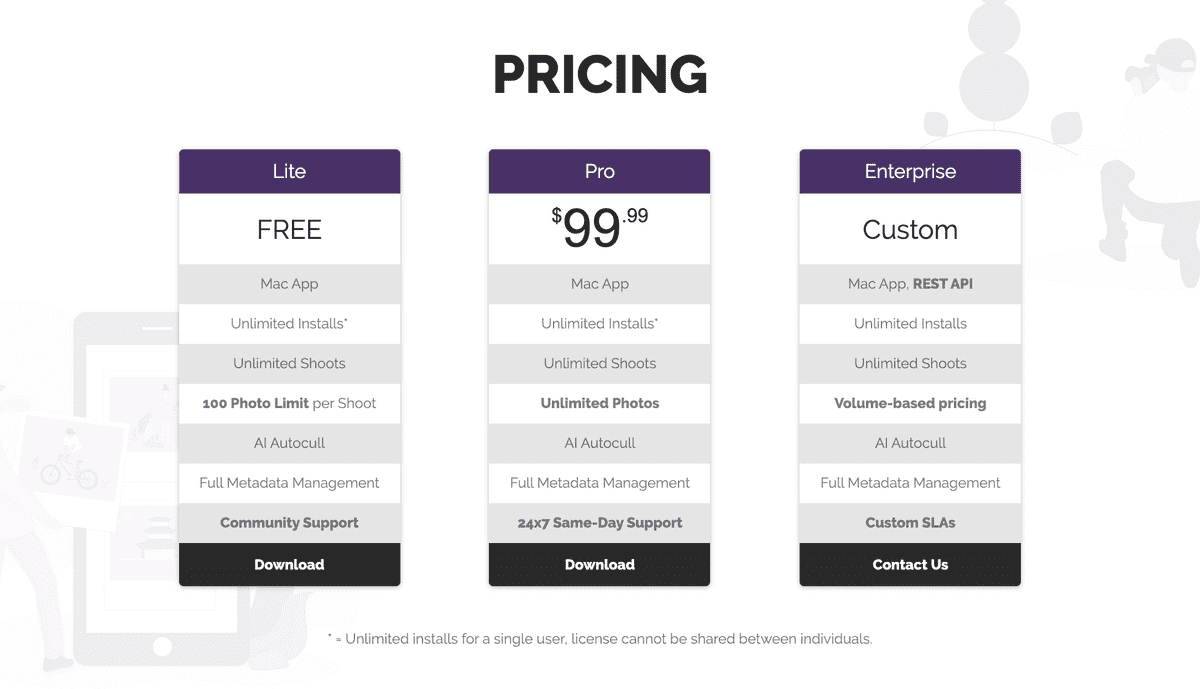
pricing table

Pricing Announced

As we begin to move out of beta, pricing details are finally here! We’re excited to provide a free tier for enthusiasts, an unlimited trial experience for professionals, and reject monthly subscription models for Optyx v1. You don’t provide a credit card until you’re confident Optyx works for YOU!

To that end, Optyx will be available in three editions:

  • Free Forever
  • Pro
  • Enterprise
pricing table
Free forever, enterprise pricing available

Free Forever

Free Forever is, as the name suggests, free to use and evaluate for as long as you like. Limits are placed on the number of photos that can be stored in a single shoot, but other app functionality is unrestricted to get the full Optyx experience.

Pro

Pro removes all limitations on the Free edition and can be installed on as many computers as you need for an individual license. Organizations or those that need multiple users to access Optyx should consider Enterprise. The Pro edition is a one-time $99 payment and provides access to all future updates on the same major version.

Enterprise

Enterprise edition offers multi-user licenses and programmatic access to Optyx analysis. Pricing is usage-based and varies based on volume and support requirements. Contact sales@optyx.app for more information.
Similar Posts

  • v1.5 Release Notes

    We’re very excited to announce the release of Optyx v1.5 and new accuracy improvements to help users like you! Improved Sharpness Labels Optyx v1.3 brought you our beta of face focus detection, and we’ve continued to iterate on your feedback! Sharpness labels are now considerably more accurate. Thanks to your help we’ve seen accuracy rates climb from…

  • Welcome to the Party, Canon!

    Welcome to the party, Canon! On Tuesday, Canon announced the upcoming release of a Lightroom plugin for AI-based photo culling. Sound familiar? ???? Here at Optyx we’re firm believers that this shift represents the future of our industry and will allow photographers to spend more time using their creative juices, shooting more, and culling less. We’re very…

  • v1.4 Release Notes

    We’re very excited to announce the release of Optyx v1.4 and new usability improvements to help users like you! Guided Walkthrough Optyx will now automatically walk new users through workflows and what makes Optyx so special. For veteran users, the new walkthrough can be accessed at any time through the Help > Start Walkthrough menu option. Improved Sharpness Labels…